Account Settings
Access the Account Settings page by clicking on the Avatar in the top left with your initials in it.

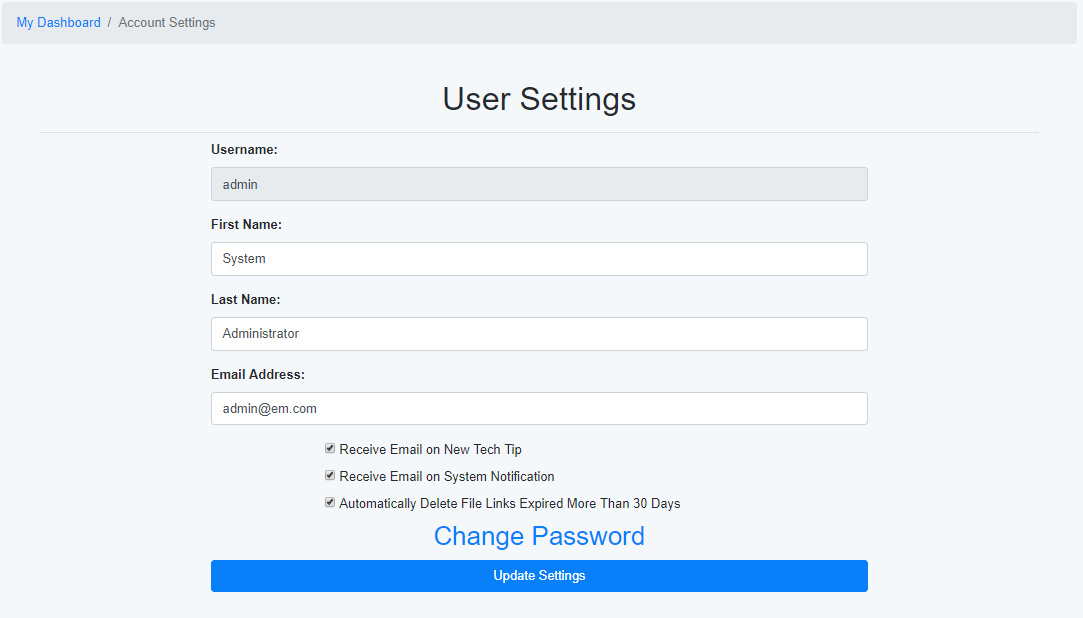
The Account Settings page allows you to change basic information about your user account. These settings can also be modified by your System Administrator.
Additional Options
- Receive Email on New Tech Tip - This will allow you to get an email notificaiton whenever a new Tech Tip is created.
- Receive Email on System Notification - This will allow you to get an email anytime there is a System Notification.
- Automatically Delete File Links Expired More Than 30 Days - Will automatically remove any File Links and their associated files if they have been expired for more than 30 days.
- Change Password - Will allow you to modify your password.
Note: Only the System Administrator can modify your username.
Note: Your new password must meet the Password Complexity requirements defined by your System Administrator.